
Discord command reference
A plain-language guide to the stable slash-command registry, with copyable examples and the safest way to recover from a mistake.
- Audience
- moderator · senior reviewer · team lead · server admin
- Availability
- free · premium preview · feature flagged · private beta access
- Maturity
- alpha · partial
Last reviewed
On this page
Choose a command from the job, not memory
Find the job you need, copy the example, then replace the fictional names and details with the real situation. This page follows the shared stable-command registry; commands that are still changing are intentionally absent.
Type `/` in the intended server, choose the command from Discord autocomplete, and fill in the named options. Always reread the member, duration, reason, and server before you press Enter.
All stable commands, with examples
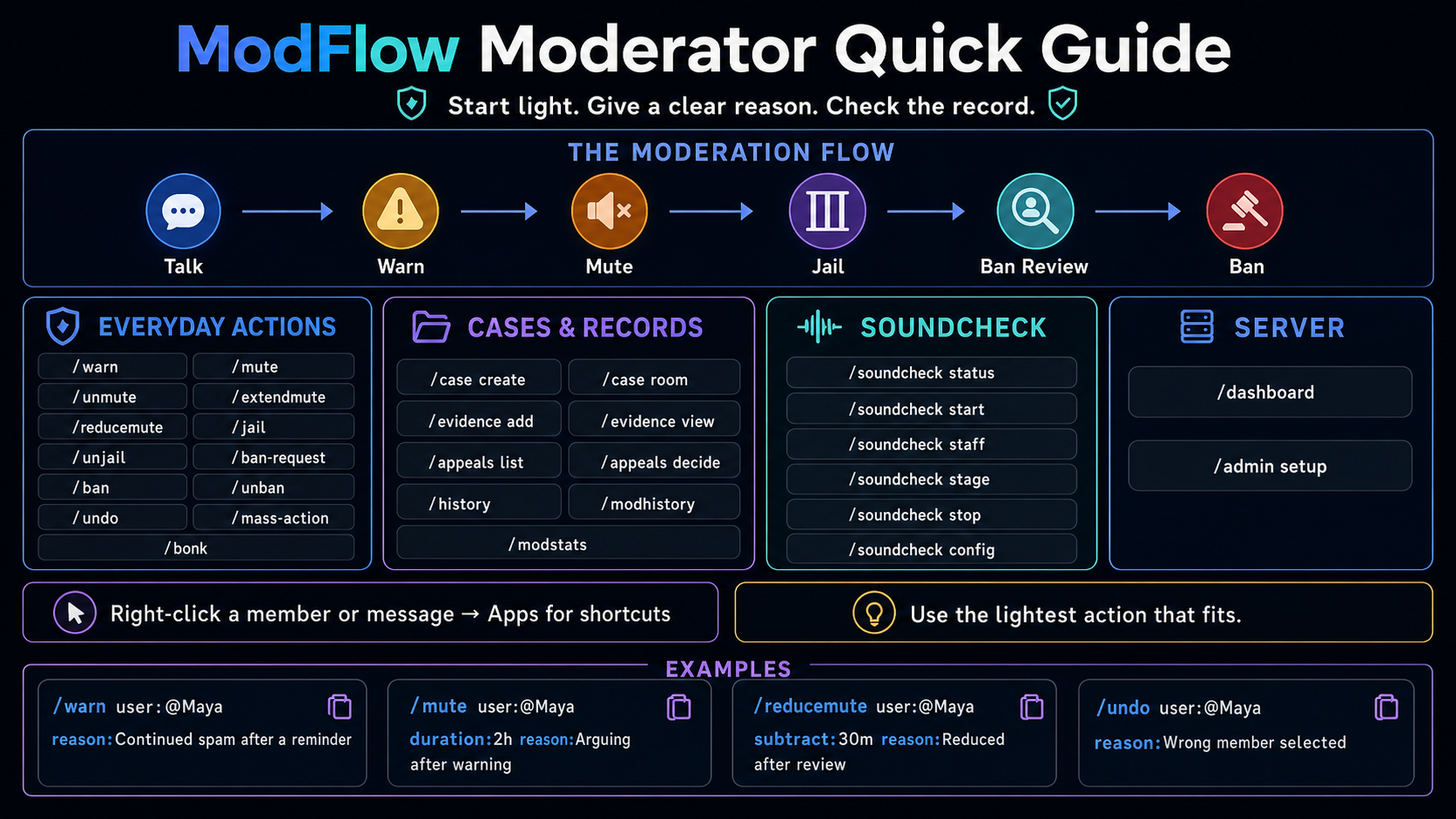
| Command | What it does | Example | Default Discord access | Check or recover |
|---|---|---|---|---|
| /warn | Adds a formal warning to the member's history. | /warn user:@Maya reason:Continued spam after a reminder | Moderate Members | Use /undo within 24 hours, or /removewarn later with a reason. |
| /removewarn | Removes the member's most recent active warning and records who removed it and why. | /removewarn user:@Maya reason:Warning overturned after review | Moderate Members | Open /history to verify the warning removal and linked Case. |
| /mute | Applies a Discord timeout and matching voice mute. | /mute user:@Maya duration:2h reason:Arguing after warning | Moderate Members | Use /unmute, /reducemute, or /undo after checking the record. |
| /extendmute | Adds time to an active mute or sets a new total from now. | /extendmute user:@Maya add:30m reason:Continued disruption | Moderate Members | Use /reducemute or /unmute. Do not set both add and total. |
| /reducemute | Shortens an active mute by an amount or to a new total. | /reducemute user:@Maya subtract:30m reason:Reduced after review | Moderate Members | Use /extendmute if the reduction was wrong. Do not set both subtract and total. |
| /unmute | Clears an active timeout and matching voice mute. | /unmute user:@Maya reason:Issue resolved | Moderate Members | Check the response and member history before taking another action. |
| /jail | Moves a member into the configured private jail flow, with an optional limit. | /jail user:@Maya limit:1h reason:Needs private staff review | Moderate Members | Use /unjail or /undo. Role restoration can still be partial. |
| /unjail | Releases a jailed member and restores their saved roles. | /unjail user:@Maya reason:Reviewed with staff | Moderate Members | Saved roles are automatically restored when the member is unjailed. |
| /ban-request | Opens a senior-review case for a proposed ban without banning the member. | /ban-request user:@Maya reason:Repeated raid coordination | Moderate Members | Open the Ban Review record. Approval and execution are separate. |
| /ban | Bans a member, optionally for a fixed duration, and can purge up to seven days. | /ban user:@Maya purge_days:1 reason:Coordinated phishing | Ban Members | Use /unban or /undo after verifying the ban record. |
| /unban | Removes a server ban using a Discord user ID. | /unban user_id:123456789 reason:Appeal approved | Ban Members | Verify the ID and final response; an unban does not restore membership. |
| /undo | Reverses the latest effective ban, jail, or mute. For warnings, /undo works within 24 hours; use /removewarn later. | /undo user:@Maya reason:Wrong member selected | Moderate Members | Check which action Discord says it reversed before doing anything else. |
| /mass-action | Bans or kicks several IDs or mentions during raid cleanup. | /mass-action action:Ban users:123456789,987654321 reason:Confirmed raid accounts | Ban Members | Review every per-user result. Never repeat the whole batch blindly. |
| /bonk | Think of it as a warning, except it has no consequences and somehow hurts more. | /bonk user:@Phantom reason:Mistook memory foam for marshmellows | No default restriction. The risk assessment consisted of “it’ll probably be fine.” | Produces no consequences beyond making the target reconsider every decision that led them here. |
| Command | What it does | Example | Default Discord access | Check or recover |
|---|---|---|---|---|
| /case create | Opens a case for a member with a reason and optional title, type, priority, and recommendation. | /case create user:@Maya reason:Review repeated harassment priority:High | Moderate Members | Open the returned case number before adding evidence. |
| /case room | Creates or shows the private Discord room for a case. | /case room case_number:104 | Moderate Members | Confirm the case number and your access to its private room. |
| /evidence add | Adds an external evidence reference to an active case. | /evidence add case_number:104 title:Message archive description:Source messages from report visibility:Staff | Moderate Members | Use /evidence view and confirm the title, source, and visibility. |
| /evidence view | Shows recent evidence for a case you may access. | /evidence view case_number:104 | Moderate Members | A missing item may be restricted or unavailable; do not copy around access checks. |
| /appeals list | Lists appeals, optionally filtered by status. | /appeals list status:Pending | Moderate Members | Confirm the appeal ID before making a decision. |
| /appeals decide | Approves, denies, or escalates an appeal and can send a short note. | /appeals decide id:42 status:Approved note:Your appeal was approved; staff will verify the reversal separately | Moderate Members | Check the decision record and any separate reversal result. |
| /history | Opens one member's unified moderation profile. | /history user:@Maya per_page:8 | Moderate Members | Check the selected server and source labels before drawing a conclusion. |
| /modhistory | Shows a moderator's action history and statistics; defaults to you. | /modhistory moderator:@Alex | Moderate Members | Treat the list as recorded activity, not a performance verdict. |
| /modstats | Shows moderator activity for a lookback window of up to 90 days. | /modstats days:30 | Moderate Members | Open the underlying records when a count needs explanation. |
| /dashboard | Opens the web dashboard server picker. | /dashboard | Administrator | Sign in and choose the same server where you ran the command. |
| /admin setup | Creates or repairs supported Jail and Ban Review Discord setup. | /admin setup watchlist:false ban_review:true ban_review_role:@Senior Review | Administrator | Read what was created or reused, then check System Health. |
| Command | What it does | Example | Default Discord access | Check or recover |
|---|---|---|---|---|
| /soundcheck status | Shows active Soundcheck sessions for the server. | /soundcheck status | Moderate Members | Use this before starting or stopping a session. |
| /soundcheck start | Creates a consent-noticed case or general session. | /soundcheck start reason:Staff interview case:104 | Moderate Members | Confirm the session ID, notices, participants, and recording state. |
| /soundcheck staff | Creates a staff-only Soundcheck session. | /soundcheck staff reason:Review meeting | Moderate Members | Confirm the audience and active session before speaking. |
| /soundcheck stage | Creates an in-place Stage Channel session. | /soundcheck stage reason:Town hall review debate_queue:true | Moderate Members | Verify the Stage, notices, speaker queue, and recording state. |
| /soundcheck stop | Stops an active recording, optionally by session ID. | /soundcheck stop session:104 | Moderate Members | Wait for the final recording and transcript status; do not assume every artifact exists. |
| /soundcheck config | Changes supported Soundcheck modes and limits for the server. | /soundcheck config enabled:true max_call_minutes:45 | Moderate Members plus server checks | Reopen status and test one short consent-noticed session. |
Submit once and verify the result
Choose the job family
Start from the moderation task, not from a remembered legacy alias.
Check: The operator identifies the current registered family.
Read live options
Use Discord autocomplete and inspect required target, duration, reason, source, and visibility options.
Check: The submitted form matches the current registry.
Review and submit once
Confirm server, channel, target, reason, and action before submitting.
Check: The human owns the request and avoids duplicate interactions.
Verify the result
Read the final response and linked record, queue, case, or dashboard handoff.
Check: Success, denial, or recovery state is explicit.
The command completes one permitted server workflow or returns an access, option, or feature-state message that names the next check.
Understand Discord command syntax and autocomplete
| Part | Meaning | Example |
|---|---|---|
| Command family | The registered slash command selected from Discord autocomplete. | /case |
| Subcommand | A specific operation below a grouped command. | create or room |
| Named option | A labeled field selected in Discord; order is not the contract. | user:@Maya, duration:2h |
| Required option | Discord will not submit until it is present. | /warn requires user and reason. |
| Optional option | Can be omitted, but its default must still be understood. | /ban purge_days defaults to 7. |
| Choice/autocomplete | Use the offered current value instead of typing a remembered legacy value. | Appeal status, mass-action Ban/Kick, ban duration suggestions. |
Type the base command
Begin with / and select the exact current command.
Check: A registered command is selected.
Read every option label
Tab through required and optional fields; expand choices/autocomplete.
Check: The form matches the current payload.
Complete the target first
Select the member, user ID, Case number, appeal ID, or session ID.
Check: The workflow is attached to the intended subject.
Review destructive/default options
Check purge, duration, visibility, status, or cancellation before submission.
Check: Defaults are intentional.
Submit once
Wait for the ephemeral or public result and linked record.
Check: Duplicate interactions are avoided.
Detailed moderation command notes
| Command | Default Discord permission | Key behavior | Correction or reversal |
|---|---|---|---|
| /warn | Moderate Members | Required user and reason; records a formal warning and resolved Case/history. | /undo within 24 hours; use /removewarn with a reason after that window. |
| /removewarn | Moderate Members | Removes the member's most recent active warning while preserving an audited removal record. | Issue a new /warn only if staff intentionally restores the warning. |
| /mute | Moderate Members | Required user/duration; native timeout plus matching voice mute; max 28 days. | /unmute, /reducemute, or /undo after verifying the active action. |
| /extendmute | Moderate Members | Use add or total; allow_shorten permits an intentional shorter total. | /reducemute or /unmute; preserve the adjustment record. |
| /reducemute | Moderate Members | Use subtract or total to shorten an active mute. | /extendmute if policy supports restoring time. |
| /unmute | Moderate Members | Clears timeout and attempts voice cleanup; results can differ. | A new mute is a new decision, not an undo of unmute. |
| /jail | Moderate Members | Optional limit; applies configured role/channel workflow and active jail record. | /unjail or /undo; role restoration is best effort. |
| /unjail | Moderate Members | Releases a jailed member and restores their saved roles. | A new jail requires a new reason/decision. |
| /ban-request | Moderate Members | Creates a senior-review request; does not ban. | Withdraw/resolve through Ban Review state, not /unban. |
| /ban | Ban Members | Optional purge 0–7 days, reason, temporary/permanent duration, expiry alert. | /unban or /undo after checking the exact ban. |
| /unban | Ban Members | Uses numeric user ID; removing a ban does not restore membership/roles. | A new ban is a new action. |
| /undo | Moderate Members | Reverses the latest active ban, jail, or mute, or a warning issued within the last 24 hours. | Read which action it selected; it is not a general history eraser. |
| /mass-action | Ban Members plus feature/team checks | Ban/Kick up to 50 valid unique IDs/mentions; per-target best effort. | Review each result; reverse only confirmed affected targets individually. |
| /bonk | No default restriction, literally zero | Applies no punishment whatsoever. The target simply knows what they've done. | Recovery is immediate. Emotional recovery may take longer. |
Cases, evidence, appeals, and review commands
| Command | Purpose | Important boundary |
|---|---|---|
| /case create | Create an open server-scoped Case for a member and moderation question. | Case visibility and action authority remain separate. |
| /case room | Create/show the supported private Discord room for a Case number. | A room does not make all evidence visible. |
| /evidence add | Add an external evidence reference with title, description, optional URL, and visibility. | Choose staff or senior visibility before submitting. |
| /evidence view | Show recent visible evidence for a Case number. | Missing evidence can be restricted or unavailable. |
| /appeals list | List appeals, optionally filtered by status. | Confirm the appeal ID and selected server. |
| /appeals decide | Approve, deny, or escalate an appeal with a concise note. | A decision and a reversal are separate outcomes. |
| /history | Open a member’s unified server-scoped moderation profile. | Network-only and excluded intelligence behavior are not operating instructions here. |
| /modhistory | Show basic recorded activity for a moderator; defaults to the caller. | Activity is not a quality ranking or performance verdict. |
| /modstats | Show aggregate moderator activity for a lookback window. | Open underlying records before explaining counts. |
Soundcheck command modes and identifiers
| Command | Use | Verify |
|---|---|---|
| /soundcheck status | List active sessions and current state. | Use before starting/stopping to avoid duplicate or wrong-session work. |
| /soundcheck config | Configure supported server session behavior and limits. | Run one short consent-noticed test after a change. |
| /soundcheck start | Start a supported general or Case-linked session. | Session ID, purpose, notice, consent controls, and recording state. |
| /soundcheck staff | Start a staff-only review session. | Audience and current participants. |
| /soundcheck stage | Start a supported Stage mode/session and optional reviewed speaker queue. | Stage identity, speaker controls, notices, and recording state. |
| /soundcheck stop | Stop the intended active session, optionally by session ID. | Final recording, transcript, publication, and missing-artifact status separately. |
Common command denials and safe recovery
| Response | Likely boundary | Safe next step |
|---|---|---|
| Command not shown | Not registered, feature-flagged, or default Discord permission hides it. | Use autocomplete, check server feature state, and do not use a legacy alias. |
| Permission denied | Discord permission, ModFlow team permission, page/feature authority, or supervised tier. | Request only the missing operation capability. |
| Member not found | Wrong server, stale mention, or member left. | Verify numeric user ID and current membership. |
| Cannot manage/moderate | Role hierarchy, owner/protected target, or bot permission. | Do not broaden permissions blindly; ask an administrator to inspect hierarchy. |
| Invalid duration/options | Unsupported format, mutually exclusive fields, or out-of-range value. | Use current field descriptions and autocomplete. |
| Feature locked/unavailable | Plan, preview, approval, or production flag. | Use a documented alternative and current Plan/Health status. |
| Interaction expired/failed | Stale component or delayed response. | Check the owning record and Discord state before retrying. |
| Completed with warning | Primary action succeeded; secondary cleanup/notification/artifact failed. | Assign only the remaining recovery. |
A command may have executed even though the response failed
What you see: Discord shows an interaction failure or timeout, but the external action is uncertain.
What may be happening: The request can complete after the client loses the response, or a record can be written before a later side effect fails.
What to do
- Check current Discord state for the target.
- Open History, Moderation Log, the Case, or queue for an existing result.
- Compare timestamps and actor before retrying.
- Escalate an uncertain duplicate-risk write rather than submitting again.
Recover a missing or failed command
Compatibility-only names may still route internally but are not current public commands. Command registration can lag deployment, and feature-flagged commands can appear or disappear by server state.
The Discord surface is missing or did not complete
What you see: A command, menu, reaction, queue, or panel is unavailable, denied, stale, or uncertain.
What may be happening: Registration, server feature access, Discord permission, ModFlow team permission, source visibility, or interaction state may not support it.
What to do
- Confirm the exact current name with Discord autocomplete.
- Check server and channel context plus required Discord permission.
- Review the matching feature guide for entitlement, flag, and maturity.
- Do not retry a moderation write before checking its record.