
Moderation actions
Apply supported warnings, mutes, bans, reversals, and dashboard actions with explicit human confirmation and an audit record.
- Audience
- moderator · team lead
- Availability
- free · premium preview · private beta access
- Maturity
- alpha · partial
Last reviewed
On this page
Choose the right moderation action
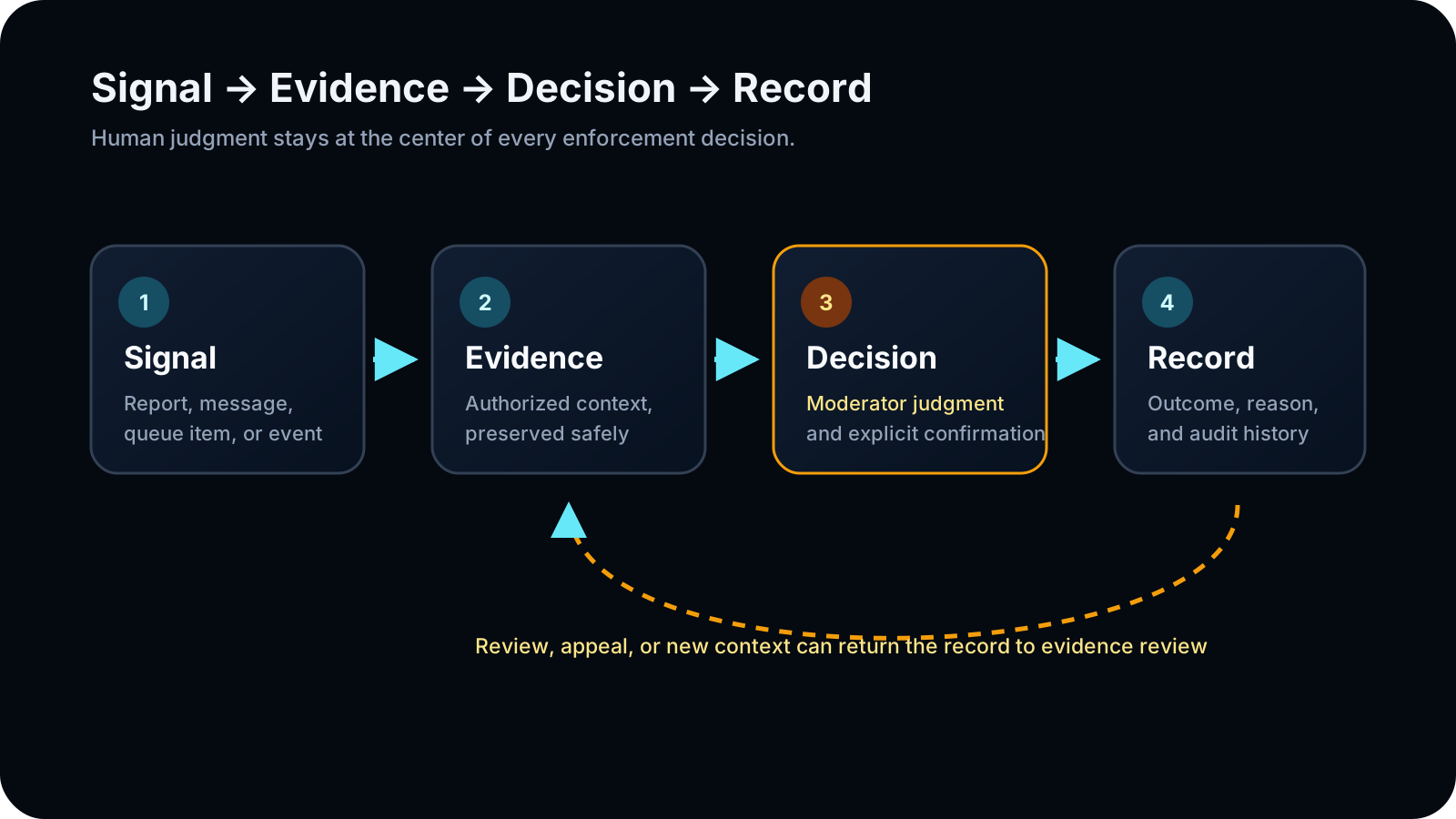
ModFlow exposes registered action families through Discord and the selected-server dashboard. The action form, confirmation, execution result, and audit record are separate states so staff can verify what was requested and what actually happened.
Confirm the target and your authority
Start beside the member or source message in Discord for an in-context action, or open Moderation Actions in the dashboard when you need a server-scoped form and execution history.
- Confirm the server and target member.
- Choose an action your role is authorized to apply.
- Prepare a policy-relevant reason and only the evidence the action's authorized audience may see.
From request to recorded result
Select the action
Choose a currently registered warning, mute, duration change, unmute, ban, unban, undo, or permitted bulk action.
Check: ModFlow presents only the action surface you selected; availability is still checked on submit.
Review the request
Enter the target, duration where applicable, reason, and evidence reference, then review the confirmation state.
Check: The staff member can catch a wrong server, target, action, or duration before execution.
Confirm and execute
Explicitly confirm the action and wait for a final success, blocked, or failed state.
Check: The human decision and the execution outcome remain distinguishable.
Verify the record
Open the action history or linked record and confirm actor, target, reason, timestamps, and outcome before retrying anything.
Check: A later reviewer can reconstruct the action and a retry does not blindly duplicate it.
Copyable action examples
A permitted action completes once and has a server-scoped audit record, or fails with a visible status that supports safe review and recovery.
| Job | Command example | Expected result |
|---|---|---|
| Formal warning | /warn user:@Maya reason:Repeated spam after two reminders | A warning action and resolved case are recorded; the member is not muted. |
| Two-hour timeout | /mute user:@Maya duration:2h reason:Continued disruption after warning | Discord applies a timeout and matching voice mute when relevant; ModFlow records the case and action. |
| Add 30 minutes | /extendmute user:@Maya add:30m reason:Continued disruption | The active mute expiry moves 30 minutes later without unmuting first. |
| Set two hours remaining | /extendmute user:@Maya total:2h reason:Senior review completed | The active mute now expires two hours from the command time. |
| Remove 30 minutes | /reducemute user:@Maya subtract:30m reason:Reduced after review | The active timeout and voice-mute schedule end 30 minutes sooner. |
| Clear the mute | /unmute user:@Maya reason:Issue resolved | The text timeout is cleared; a failed voice-unmute is reported and queued for recovery. |
| Permanent ban with one-day purge | /ban user:@Maya purge_days:1 reason:Coordinated phishing | Discord bans the member and deletes up to one day of recent messages. |
| Undo the last active action | /undo user:@Maya reason:Wrong member selected | Your most recent still-effective ban, jail, or mute on that member is reversed and the reversal is recorded. |
- Warn a member with a concise policy reason and verify the resulting record.
- Extend a mute only after checking the current duration and required permission.
- Use undo or a matching reversal only when the live action state supports it; never assume every action is reversible.
Choose the least severe effective action
Start with the operational goal: document behavior, stop immediate disruption, isolate a member for private handling, request senior review, remove access, or reverse a prior action. Then choose the narrowest supported action that meets that goal and your server policy. ModFlow records what you asked it to do, but the moderator remains responsible for proportionality, target identity, and reason quality.
| Action | Use it when | What it changes | Do not use it as | Verify afterward |
|---|---|---|---|---|
| Warn | The behavior should be formally documented, but access does not need to change. | Creates a warning action and case/history record. | A silent note, timeout, or substitute for explaining the rule. | Member, reason, moderator, timestamp, and case/history entry. |
| Mute | Text and voice participation must stop temporarily. | Applies a native timeout and matching voice mute when the member is in voice. | An indefinite hold or a way to avoid a required senior review. | Exact expiry, voice result, reason, and action record. |
| Extend or reduce mute | An active mute duration should change without removing and reapplying it. | Moves the current timeout expiry and updates the linked record. | A new punishment that hides the original decision trail. | Old expiry, new expiry, adjustment mode, and reason. |
| Unmute | The active timeout and associated voice mute should end. | Clears the current timeout and attempts matching voice cleanup. | Proof that every related case or restriction is closed. | Text timeout, voice state, and reversal record. |
| Jail | The member needs the server's configured private restriction and review workflow. | Applies the jail role, creates or reuses the jail workspace, and records an active jail. | A generic timeout or an improvised channel lockdown. | Active jail, channel access, saved-role state, duration, and case. |
| Ban request | A proposed ban needs a senior decision before execution. | Creates or reuses a Ban Review case; it does not punish the member. | An emergency ban control or a promise that approval will be granted. | Correct target, packet, reviewer state, and pending decision. |
| Ban | The member must be removed and prevented from rejoining under current policy. | Creates a Discord ban, optionally purges recent messages, and can schedule expiry for a temporary ban. | A reversible timeout or a response based only on a summary score. | Ban state, purge selection, duration, expiry alert, and record. |
| Unban | A current server ban should be removed. | Removes the ban for the supplied Discord user ID. | Restoring membership, roles, nicknames, or prior access automatically. | Exact user ID, unban result, and reason. |
| Undo | Your most recent still-effective mute, jail, or ban on the member was wrong. | Routes to the matching reversal while preserving the original action record. | A general history eraser or a reversal of warnings and arbitrary older actions. | Which action was selected and what cleanup succeeded. |
| Mass action | A confirmed raid requires the same ban or kick across many known IDs. | Processes up to 50 unique valid targets independently and reports per-target success or failure. | An unreviewed member list, speculative cleanup, or a single-result assumption. | Every target result, failure reason, and audit row. |
Field-by-field action reference
| Command | Required | Optional | Important limits |
|---|---|---|---|
| /warn | user, reason | — | The target must still be a member. A warning records history but does not restrict access. |
| /mute | user, duration | reason | Duration examples include 30m, 2h, and 1d; Discord timeouts are capped at 28 days. |
| /extendmute | user plus exactly one of add or total | reason, allow_shorten | total is measured from now. allow_shorten is needed when total would make the current mute shorter. |
| /reducemute | user plus exactly one of subtract or total | reason | The requested result must be shorter than the active mute and remain a valid Discord timeout. |
| /unmute | user | reason | The member must be resolvable; voice cleanup can report separately from timeout cleanup. |
| /ban | user | purge_days, reason, duration, alert_on_expiry | purge_days is 0–7 and defaults to 7. Duration accepts values such as 7d, 30d, 3mo, 1y, or permanent. |
| /unban | user_id | reason | Use the numeric Discord user ID. Removing a ban does not invite or restore the user. |
| /undo | user | reason | Targets the invoking moderator's most recent still-effective mute, jail, or ban for that member. |
| /mass-action | action, users | reason | action is Ban or Kick; users are IDs or mentions separated by commas/spaces; maximum 50 valid unique targets. |
| Form | Meaning | Example | Check |
|---|---|---|---|
| Relative duration | A length measured from the current command time. | 30m, 2h, 1d, 1w | Confirm the displayed expiry timestamp. |
| Mute add | Adds time to the current remaining mute. | add:30m | Confirm the new expiry is later by the intended amount. |
| Mute total | Sets a new remaining duration from now. | total:2h | Use allow_shorten only when shortening is intentional. |
| Temporary ban | Schedules the ban to expire after the parsed duration. | duration:30d | Confirm the stored expiry and whether staff should be alerted. |
| Permanent ban | No scheduled expiry. | duration:permanent or omit duration | Confirm that permanent is intended before execution. |
Temporary bans, expiry, and staff alerts
A temporary ban is still a real Discord ban. ModFlow stores the intended expiry so background work can attempt the unban later. The future attempt can fail if the server, permissions, target state, or worker state changes, so staff must verify the final record rather than assuming a duration guarantees release.
Choose the duration
Use a specific value such as 7d, 30d, 3mo, or 1y. Use permanent only when no automatic expiry is intended.
Check: The command displays a valid permanent or temporary interpretation.
Choose the purge window
Set purge_days from 0 through 7 after considering evidence preservation and server policy. Do not rely on the default without reviewing it.
Check: The requested message-deletion window is explicit.
Decide whether staff need an expiry alert
Set alert_on_expiry when the server wants a staff notification after the scheduled unban attempt.
Check: The record states the alert preference.
Verify after the expiry time
Open the moderation record and current Discord ban state after the scheduled time.
Check: Staff can distinguish successful unban, failed execution, already-unbanned state, and pending recovery.
High-volume and raid cleanup playbook
Mass action is best-effort per target: one failure does not stop the rest of the batch. This is useful during confirmed raids, but it also means a single summary line is not enough for handoff. Preserve the input list, compare the success and failure sets, and follow up only on the failed IDs.
Freeze the target list
Build the list from confirmed IDs or mentions and remove uncertain accounts before running the command.
Check: The command input contains only targets staff intend to ban or kick.
Choose Ban or Kick
Use Kick only for members currently in the server; use Ban when re-entry must be blocked.
Check: The action matches the incident objective.
Submit one fixed batch
Use no more than 50 valid unique targets and provide a reason that identifies the incident.
Check: ModFlow processes each target once in that batch.
Reconcile every result
Read the succeeded count, invalid/truncated warning, and each listed failure. Check moderation history before running a smaller follow-up batch.
Check: No target is repeated merely because another target failed.
The batch partly succeeded
What you see: Some IDs succeeded while others failed, were invalid, or were omitted after the target limit.
What may be happening: Members can leave, IDs can be malformed, role hierarchy and Discord permissions can differ, and the command intentionally continues after individual errors.
What to do
- Keep the original result message.
- Check each failed ID against the current server and ban state.
- Correct only the failed subset.
- Run a follow-up command only after verifying the target was not already affected.
Post-action verification and handoff
| Check | Question | Where to verify |
|---|---|---|
| Identity | Was the intended Discord user affected in the intended server? | Ephemeral response, member profile, or ban list. |
| Authority | Which moderator requested the action, and which actor executed it? | Action record and case timeline. |
| Reason | Does the reason describe behavior and context clearly enough for another reviewer? | Action record and configured log. |
| Timing | What started, ended, or is scheduled to expire, and when? | Discord state, expiry timestamp, scheduled record. |
| Side effects | Did voice mute, role cleanup, purge, notification, or scheduled work complete? | Final response and linked execution events. |
| Recovery | Is there a failed, partial, denied, or retryable state that still needs an owner? | Owning detail page and timeline. |
Permission, feature, and evidence boundaries
Command registration, Discord permissions, ModFlow team permissions, entitlements, and feature flags can all narrow the available action set. A success message does not make unrelated evidence visible, and a failed response should be checked against the audit record before retrying.
Recover without duplicating an action
The result is not what you expected
What you see: The control is missing, permission is denied, or the result is failed or uncertain.
What may be happening: The server, feature gate, Discord permission, team permission, target hierarchy, or execution state may not support the request.
What to do
- Confirm the selected server and target.
- Check the action record before retrying.
- Ask a server administrator to verify the server-scoped permission or feature gate.
- Escalate an uncertain execution state with its record identifier and do not repeat the action blindly.
Hand off the action record—not copied private evidence—to the next authorized reviewer. Use Cases and evidence when a decision needs a longer evidence trail.