
Cases and evidence
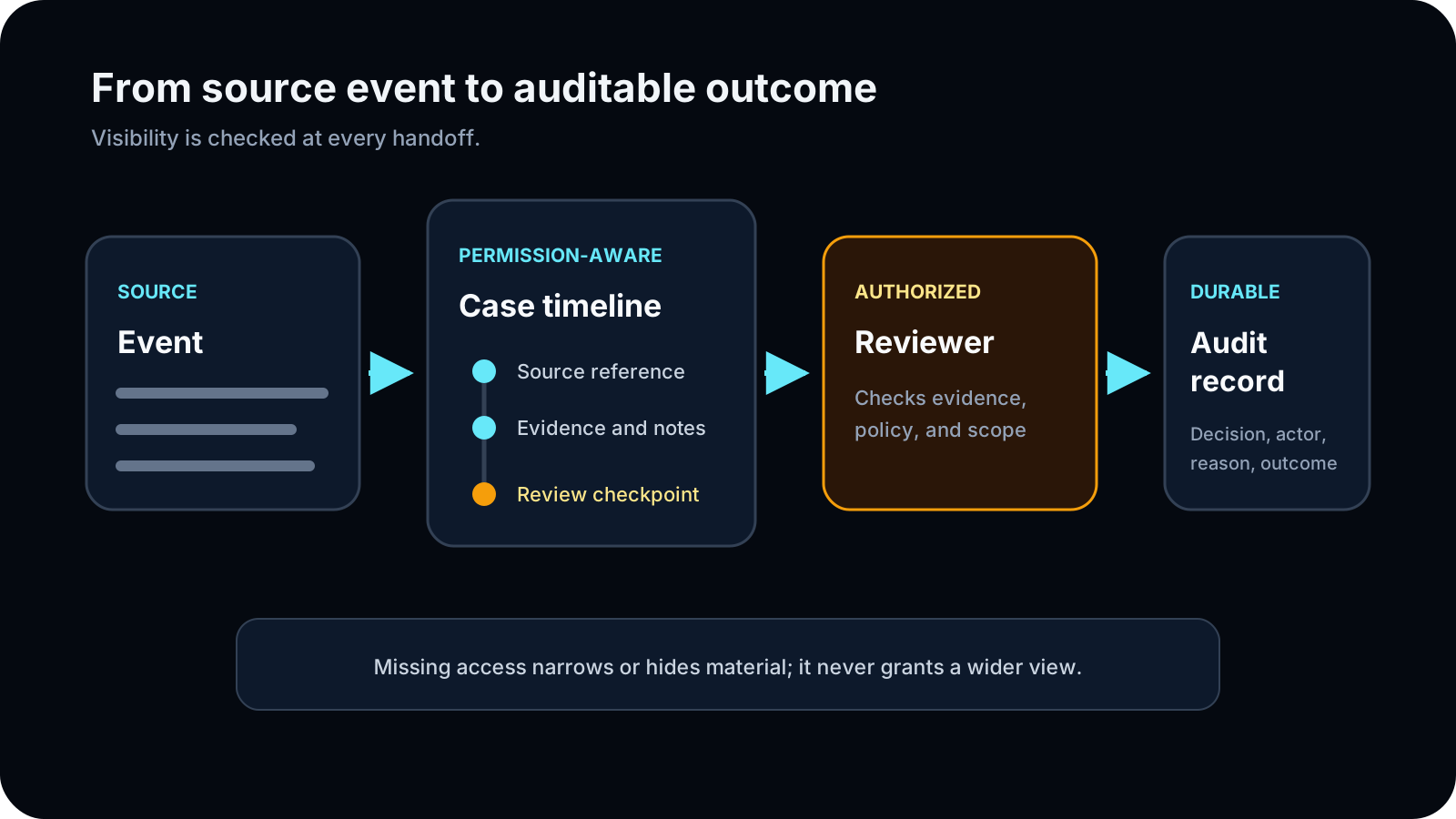
Build a permission-aware case timeline with source provenance, reviewer visibility, decisions, and durable records.
- Audience
- moderator · senior reviewer · team lead
- Availability
- premium preview · private beta access
- Maturity
- alpha · partial
Last reviewed
On this page
What belongs in a case
Cases connect source material, people, staff discussion, a human decision, separately authorized execution, and the final audit timeline. Evidence keeps source identity and access boundaries so a visible case does not automatically expose every artifact.
Confirm visibility before collecting evidence
Start from a registered Discord message or user action when the source context matters, or open Cases and the Review Queue in the dashboard for longer investigation and handoff.
- A defined moderation question and selected server.
- A source message, record, file, transcript, or staff observation with clear provenance.
- An authorized audience and visibility setting appropriate to the material.
Build a case another moderator can follow
Open or claim the case
Create or open the server-scoped case, confirm its subject and scope, and claim or assign review where supported.
Check: The case has a responsible reviewer without changing evidence visibility.
Preserve evidence
Attach or reference relevant material with its source identity, context, and permitted audience.
Check: Reviewers can distinguish original material from summaries or staff-authored context.
Discuss and decide
Record staff reasoning and the human decision, including a reason and next action where appropriate.
Check: The decision is attributable and does not silently execute punishment.
Execute and close
Use the separate execution control if authorized, verify its outcome, then close or hand off the case with a complete timeline.
Check: The record preserves evidence, decision, execution state, and recovery details.
Case and evidence examples
Authorized reviewers can reconstruct what was known, who decided, what was executed, and which evidence remained hidden or redacted for their role.
/case create user:@Maya reason:Review repeated harassment priority:High type:Harassment/case room case_number:104/evidence add case_number:104 title:Message archive description:Reported messages from #general url:https://example.org/archive/104 visibility:Staff/evidence view case_number:104- Create a case from a source message while preserving the message identity and nearby context.
- Request additional evidence instead of inferring facts from a partial transcript.
- Expose a case summary to a reviewer while keeping an attachment unavailable when its source permission check fails.
Case identity, scope, and status
ModFlow uses one canonical Case model per server. The internal Case ID powers routes and relationships; the human-facing case number is allocated within the Discord server. Never use a case number by itself as a cross-server identity.
| Field | Use | Operator guidance |
|---|---|---|
| Case number | Human-readable reference shown to staff within one server. | Always pair it with the server when handing off. |
| Internal Case ID | Dashboard routes, APIs, buttons, evidence, members, comments, and execution links. | Use the supported links rather than editing IDs manually. |
| Occurred at | Chronological position of the incident. | Imported/backfilled storage time can be later than the actual incident. |
| Created at | When ModFlow stored the Case. | Do not substitute it for the event time during historical review. |
| Status | Current work state such as open, under review, escalated, or closed. | Read the latest timeline event before taking a transition. |
| Priority and type | Triage labels for the server's review process. | They organize work; they do not prove severity or authorize a sanction. |
- STAGE 01
Created
A command, message action, moderation event, import, appeal, jail, or staff form creates or reuses the server-scoped Case.
- STAGE 02
Owned
A reviewer or team claims, receives, or is assigned the work where supported.
- STAGE 03
Investigated
People, evidence, comments, source checks, and requested material build the review record.
- STAGE 04
Decided
An authorized human records the outcome and any recommended action.
- STAGE 05
Executed
A separately authorized action attempt records success, denial, failure, or retry state.
- STAGE 06
Closed or reopened
Staff finalize the record or reopen it when new information requires more work.
Case workspace tour
| Area | Purpose | Common actions | Boundary |
|---|---|---|---|
| Header and readiness | Confirm case identity, status, priority, owner, team, and next action. | Claim, reassign, escalate, request evidence, close, reopen. | Controls depend on current state and team permission. |
| People | Identify the subject, reporter, witnesses, staff, or other involved members. | Add or remove involved people and roles in the incident. | Being listed does not grant the person access to the case. |
| Evidence | Review messages, files, links, transcripts, context windows, and staff-provided material. | Add, remove, mark key, inspect source health, comment, or change supported visibility. | Case access does not automatically reveal sensitive evidence. |
| Discussion | Keep staff reasoning and handoff context with the case. | Comment, request clarification, record dissent, and identify follow-up. | Comments are staff-authored context, not source evidence. |
| Timeline | Reconstruct creation, changes, evidence, decisions, executions, and recovery. | Read latest event, inspect actor and timestamp, compare state transitions. | Some events can be redacted while preserving a safe summary. |
| Decision | Record the authorized human outcome and recommended response. | Set outcome, reason, supporting evidence, and next step. | Decision is not proof that Discord execution succeeded. |
| Action rail / dock | Perform the separately authorized action and inspect its state. | Execute, retry eligible failure, or review prior attempt. | Current Discord authority and target state are rechecked. |
| Export and link health | Produce a focused case report or check source and artifact links where supported. | Export visible data and review unavailable references. | Exports and link checks preserve caller visibility and cannot recover every source. |
Evidence types and provenance
| Source | Preserve | Common failure | Safe response |
|---|---|---|---|
| Discord message | Server, channel, message ID, author, timestamp, jump URL, captured text/version where allowed. | Message deleted or source channel no longer visible. | Keep provenance and mark the source unavailable; do not paste private copies into wider notes. |
| Conversation window | Anchor message, nearby context, and source identities. | Some messages are inaccessible or outside the supported window. | State the window limits and request additional authorized evidence. |
| Uploaded file or screenshot | Title, description, uploader, visibility, storage identity, and original context. | Local file missing, unsupported type/size, or viewer lacks access. | Record the missing artifact and request a replacement through the same guarded route. |
| External URL/archive | Title, description, URL, who added it, and why it matters. | Link expires, changes, or requires separate access. | Do not treat the URL as durable proof; preserve an authorized snapshot only when policy allows. |
| Jail or Soundcheck transcript | Session/case link, artifact status, speakers, timing, visibility, and processing state. | Recording or transcript was never produced or is still processing. | Use only the artifact that actually exists and document gaps. |
| Staff observation/note | Author, time, observation, source reference, and uncertainty. | Interpretation is written as fact. | Separate what was observed, inferred, and still needs verification. |
| Moderation/history record | Action type, target, actor, source, occurrence time, and linked Case. | Imported provider is mistaken for the acting moderator. | Read source and actor separately. |
Evidence visibility, redaction, and reviewer access
| Question | Why it matters | Operator action |
|---|---|---|
| Can the viewer open the Case? | Case-list access is the first layer only. | Confirm case_review.view and team scope. |
| Can the viewer see this evidence tier? | Senior-only or sensitive items may be hidden or summarized. | Use an authorized reviewer; do not change visibility merely for convenience. |
| Can the viewer open the source? | A captured reference cannot grant a hidden-channel permission. | Run the supported source/message check and record unavailable state. |
| Can the viewer download the file? | File routes can apply separate storage and evidence checks. | Use the guarded route, not a copied host path. |
| May the viewer decide or execute? | Review, decision, and enforcement permissions differ. | Hand off only the missing step to the authorized role. |
Case quality and closure checklist
Confirm the question
State what staff are deciding and which server policy applies.
Check: The Case has a clear purpose.
Verify identities
Confirm subject, reporter, involved people, source channels, and case/server identity.
Check: Similar names or cross-server references are not confused.
Review both supporting and contradictory material
Mark key evidence, record missing context, and avoid relying only on the first report.
Check: The decision reflects the available record and uncertainty.
Record the human decision
Name the outcome, reason, evidence relied on, dissent or limitation, and next action.
Check: Judgment is attributable.
Verify execution separately
Read the action result and downstream side effects before closing.
Check: Approved and applied states are not conflated.
Close with a handoff-quality summary
State final status, remaining limits, notifications, and whether follow-up is scheduled.
Check: Another authorized reviewer can reconstruct the result.
Evidence access stays separate
A case row can outlive a source link or local artifact. Local file defaults are not a promise of global durability, indefinite retention, or cross-server portability. Redacted or inaccessible evidence must not be reconstructed into a wider audience through copied notes.
Recover missing or hidden evidence
The result is not what you expected
What you see: Evidence is unavailable, redacted, stale, or the case cannot advance to decision or execution.
What may be happening: The source may be missing, the viewer may lack access, the case may be unclaimed or incomplete, or the requested state transition may not be valid.
What to do
- Confirm the selected server and current viewer permission.
- Use the source/message check before relying on a link.
- Request replacement evidence with provenance instead of copying restricted material.
- Record the blocked state and escalate to an authorized reviewer.
Handoff should name the case, current state, responsible reviewer, remaining question, and visible evidence—never a private artifact pasted outside its allowed audience.
Check where evidence came from
Case material can come from Discord message search and context capture, staff uploads and links, imported records, transcripts and recordings, Watchlist or appeal links, and—only when an approved MIRA preview is enabled—sanitized image derivatives or explicit public-web snapshots. A source link is not proof of authenticity or permanent availability.
- Case IDs are stable server-scoped identities; display numbers are human-readable references and must not be substituted across servers.
- Discord search rechecks channel visibility, limits the result window, and may omit deleted, unavailable, or permission-blocked context.
- Rehosted files and generated derivatives are separate retained copies with their own provenance, access, and deletion lifecycle.
- Historical Case-link remediation may still be release-dependent; report an obviously mismatched transcript, Watchlist link, or displayed Case number rather than trying to repair it yourself.